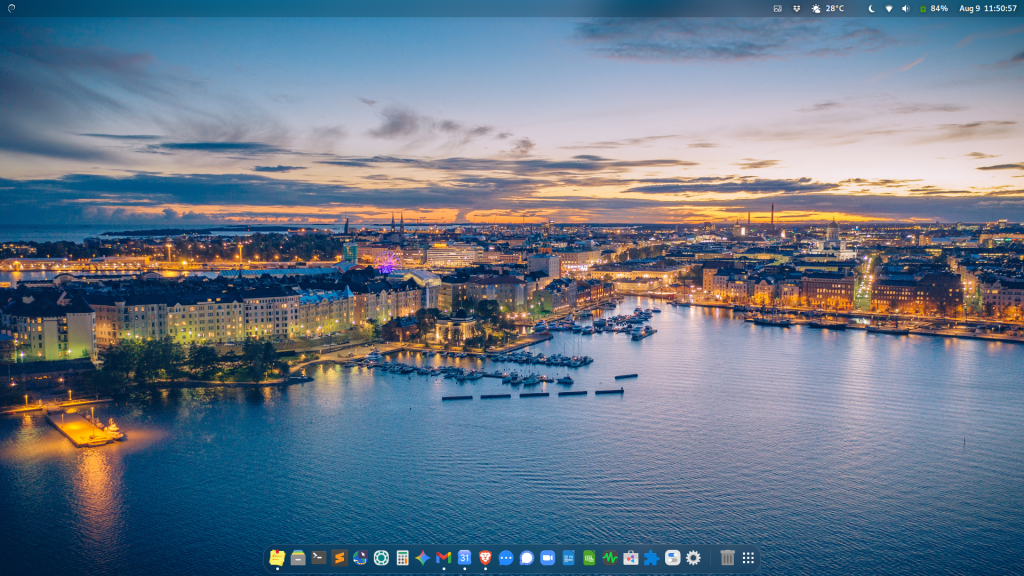
My desktop Linux distribution of choice is Debian with GNOME.
Debian is a point-release operating system, which means updates are infrequent unless strictly necessary for security or bug fixes. It serves as the foundation for many popular Linux variants, including Ubuntu and Linux Mint, and powers countless servers worldwide thanks to its long-term stability and thoroughly vetted updates. Because of this deep lineage, Debian functions almost like a lingua franca for Linux. Documentation, tips, and tricks are everywhere online, and ubiquitous Ubuntu advice is easily adapted to fit a Debian system.
Over the years, I have tried several other major distributions, but after evaluating the trade-offs, I landed on Debian:
- Ubuntu: I have used Ubuntu in the past, but to me, it feels overly prescriptive about how you should work. The whole point of Linux is the freedom to make an operating system your own, and Ubuntu’s rigid approach violates that principle.
- Linux Mint: Mint is an excellent distribution, but its overall layout and workflow are better suited to former Windows users.
- openSUSE: I really liked openSUSE when I used it, but I found it required some effort to maintain. By contrast, Debian and Fedora “just work” out of the gate. Audio, wireless networking, and printers are detected instantly without needing to troubleshoot, hunt down drivers, or perform extra configuration.
- Fedora: Fedora is a top-tier distribution that I really like, but it sits on the leading edge of Linux and updates frequently.
There are a few others I tried briefly along the way:
- ZorinOS: I didn’t care for it, for reasons similar to why I disliked Ubuntu.
- Arch Linux: A big nope. I want a system I can quickly adapt and start using as a daily driver without a steep manual setup process.
- BSD Variants: While not Linux, I even got FreeBSD running with GNOME at one point, but the overall experience fell flat. Between the setup hurdles and desktop polish issues, in my view both FreeBSD and OpenBSD are fundamentally unsuited for daily desktop needs.
- Manjaro: It was an “almost,” but while hard to pinpoint, it revolves largely around overly complicated theme customization, and a prescriptive approach similar to Ubuntu.
- elementary OS: An interesting project, but ultimately not what I was looking for.
At the end of the day, I need pure GNOME running on a well-documented, stable operating system.
The distinction in update frequency matters to me. Having used these types of operating systems since the mid-1990s, I still have tech nostalgia for working with servers running SCO Unix (System V Release 4). Those servers simply never needed to be rebooted. I distinctively remember checking the uptime on one server right before a reboot to install updates from floppy disks, it had been running continuously for almost two years. Debian brings me much closer to that high-uptime, “never have to reboot” ideal.
As for my graphical workspace, I paired Debian with the GNOME desktop environment. My preferred desktop aesthetic leans toward macOS, and GNOME (along with perhaps Cosmic) comes closest to capturing that behavior and feel.
With a few targeted extensions and themes, GNOME makes it effortless to build a custom look and feel. I themed the maximize, minimize, and close buttons to match the macOS “traffic light” aesthetic that I enjoy. However, I deliberately chose modern Linux icon sets rather than a macOS clone pack. I am not trying to recreate macOS pixel-for-pixel; I just want to keep the overall visual orientation and muscle memory consistent.
As an aside, I still use macOS for music recording and production. I had some success using Linux for audio and video prodution, but Apple’s architecture is superior for this. Their XNU kernel design, Core Audio subsystem, and the M-series chips are unbeatable for real-time media tasks. macOS handles preemptive scheduling and resource management exceptionally well, preventing sudden CPU spikes under heavy audio loads. The gaming inroads into Linux are driving performance in the area of low-latency kernel improvements. Perhaps within another decade Linux will be just as capable for these specialized workflows.
Debian with GNOME hits the sweet spot for me. It gives me the set-it-and-forget-it stability of classic Unix, while still offering the flexibility to build an efficient, macOS-inspired workspace. It isn’t trying to prescribe how I work or force constant updates on my workflow. Once I have built a workspace that feels like home, it simply gets out of the way and lets me get on with what I am trying to do.